This month: a Training tab that tells you what you can fly and what to train next, fleet invites straight to your Discord DMs, a Trial tab for new pilots, and the story of our first quiet fleet.
Town Hall #38 highlights
Missed the November town hall? The highlights cut covers it in a fraction of the time.
What can I fly? What should I train?
The new Training tab on your account checks every one of your characters against every doctrine fit. It shows what you can fly today, and how long until the next ship is ready.
- What you can bringEvery doctrine and role in one table. If you multibox, it counts how many of your accounts can fly each role at once.
- One goal per characterEach character works toward one doctrine ship. The others wait in line, and you can change the order whenever you like.
- A plan you can paste into EVETrain to Ready, which is good enough for fleets, or all the way to Optimal. Then copy the skill list straight into your EVE queue.
An FC might invite you to a fleet
FCs can now invite you to an upcoming fleet with a Discord DM. Press I’m in or Sitting out, then pick your ship on the site.
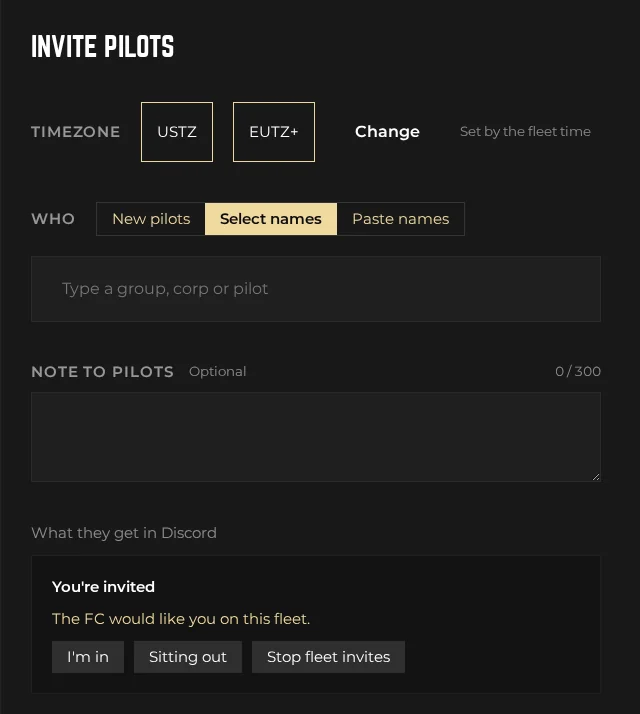
- One a week, at mostHowever many fleets are going up, you get at most one invite a week.
- Only when you playInvites follow the fleet time, so you only hear about fleets in your timezone.
- Easy to switch offEvery DM has a Stop fleet invites button. You can turn them back on under Account › Notifications.
- New here?FCs can invite pilots in their first week, so your first fleet can come looking for you.
Your trial, at a glance
Just joined? The Trial tab shows how far through your trial you are, how long trials in your corp usually take, and what will get you to full member.
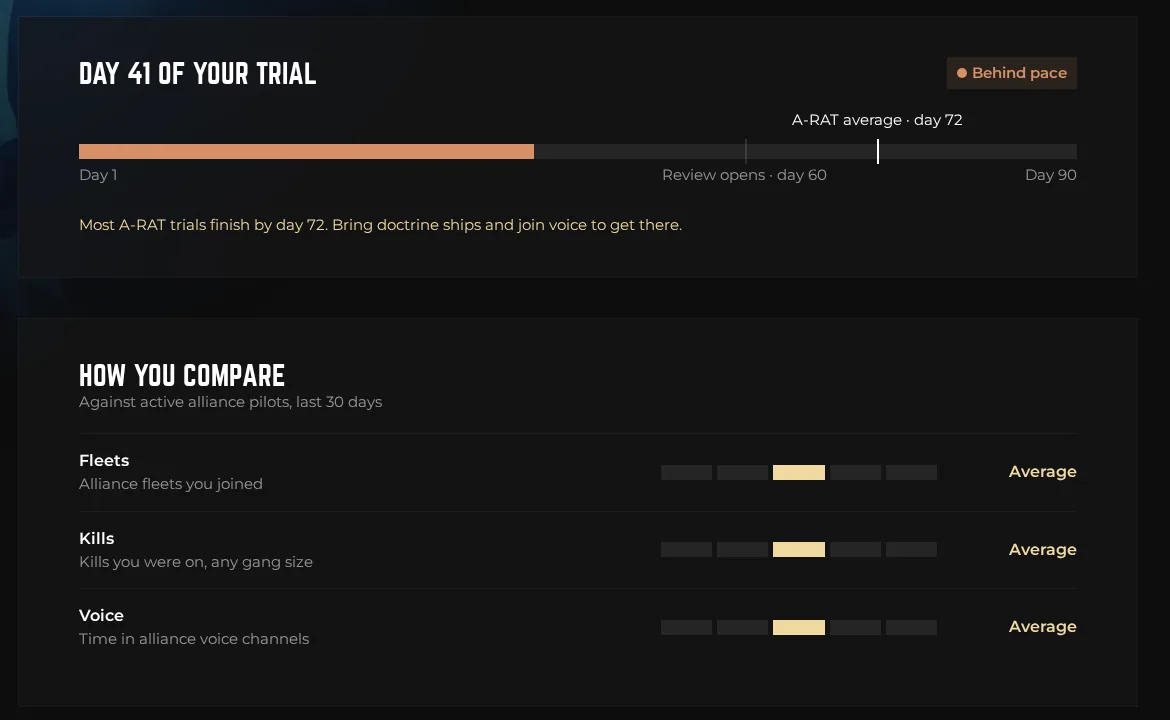
- Where you areYour day of the trial, when review opens at day 60, and when most trials in your corp finish.
- How you compareYour fleets, kills and time on comms over the last month, from well below to well above average. You see where you sit, not a ranking.
- What you broughtEvery fleet you flew and whether your ship was on the doctrine, so you know what to bring next time.
- For CEOsPromote a trial pilot from your corp’s Members tab. Applications now close on their own once the pilot joins your corp in game.
The fleet nobody saw coming
Strategic FCs can now run invite-only fleets. They never appear on the schedule or in pings. The FC invites pilots by Discord DM, and everyone who says yes joins a private thread.
Quiet mode fleet · Saturday 24 October
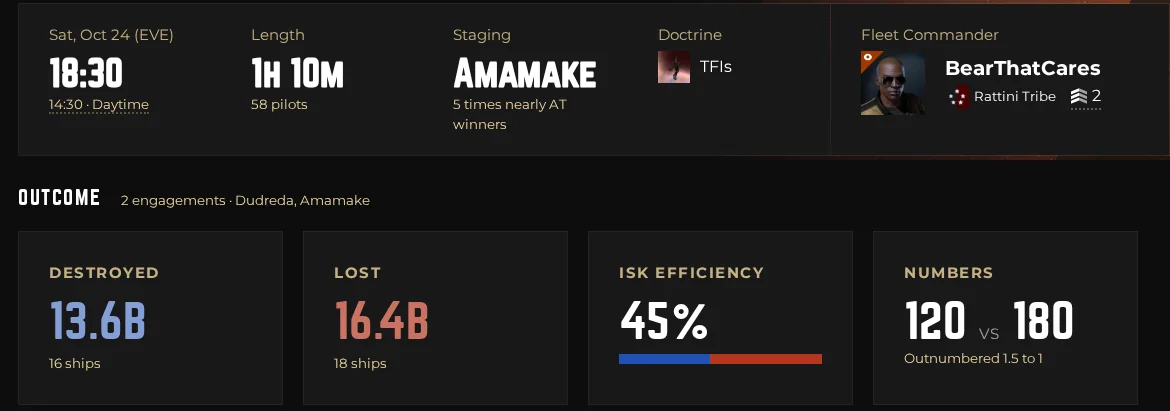
Word was that something big might kick off near Amamake, so BearThatCares kept the fleet off the schedule. Seven waves of invites went out, 38 pilots said they were in, and the FC asked for 40 dreads, 30 TFIs and 20 logi.
We waited at the login screen, then took the fight in Dudreda against Cryonic Origin and Ahbazon-Prime, outnumbered 1.5 to 1. The ISK went their way, 13.6B to 16.4B, but nobody saw us coming. Once it was over, the FC declassified the fleet, so its reports are public now.
- Invites in wavesPick pilots, tribe groups or corps, or paste a list of names, and send more waves as the night takes shape.
- Ship targetsThe FC sets targets like 40 dreads and 20 logi, and pilots see what’s still needed when they pick a ship.
- A private threadEveryone who says yes gets a Discord thread for updates, and the start ping goes there.
- Declassify afterWhen it’s over, one button puts the fleet in history with its reports. Who was invited stays private.
Battle reports for the whole fleet
- The whole night A fleet’s battle report now covers every kill and loss from form-up to dock, not just one fight.
- Drag to zoom in Drag across the timeline to focus on one fight or one leg of a roam, then share the link.
- Fights worth keeping FCs can save and name the fights that mattered, so everyone can find them in one click.
- Reports by EVE mail After each fleet, the FC gets an EVE mail with the numbers and links to both reports, ready to share.
More tools for fleet commanders
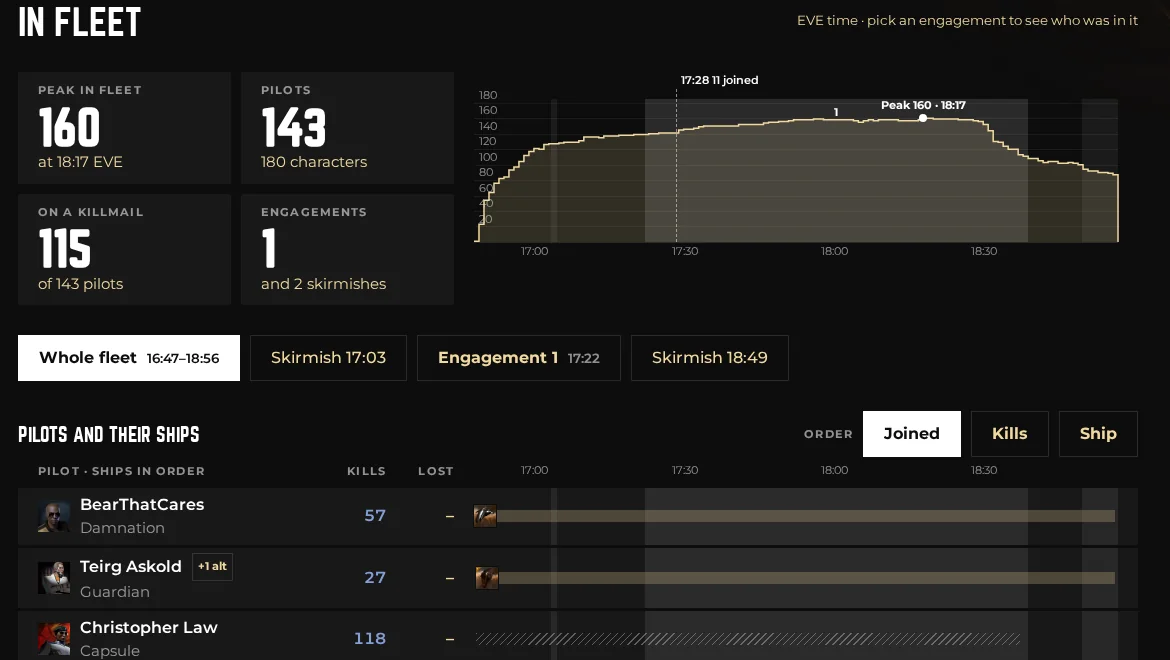
- Participants Every pilot in the order they joined, with their ships, and who was on grid for each fight.
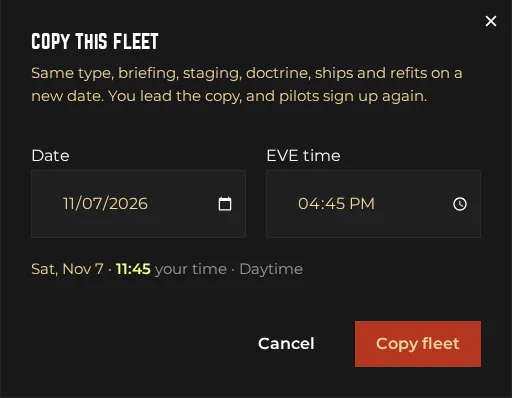
- Copy this fleet Same doctrine, briefing and staging on a new date. Pick the day and time, and you’re done.
- Run it on an alt Fleet boss on another character? Tracking finds it, and the site still shows you as the FC.
- Bring what you have Pilots can sign up in a ship that isn’t on the doctrine, so the FC knows what’s coming.
- Private sign-ups New fleets hide who signed up from other pilots. The FC still sees everyone.
- Academy fits Secondary fits are now called Academy fits, and only Academy pilots can bring them.
Easier to find your people
- Tribe invitations Tribe chiefs can invite you to their group. You get a DM and join in one step, no application needed.
- Corp Discord links Corps can put their Discord server on their page, so you can say hi before you apply.
- Apply from any tab Submit Application now sits at the top of every corp page.
- No forgotten applications Already joined the corp in game? Your application closes itself within half an hour.
Smaller things you'll notice
- Timezone roles Discord now gives you a USTZ, EUTZ or AUTZ role based on when you actually play, so pings reach people who are online.
- Fairer build orders Industry orders are priced against Jita or as a margin over build cost, and never below what a ship costs to build.
- Build planner Set how many runs your blueprint copies have, and the material bill matches the jobs you will actually install.
- Desktop app 0.12 The Recent tab lists your last fleets by day, with kills, losses and SRP status. Already installed? It updates itself.
- No hidden tabs Pages with lots of tabs now wrap them onto a second row instead of hiding them off the edge.
- Tidier buyback Finished buyback sales now close properly, along with their Discord thread.
Found a bug? Want something built?
Open a ticket in #help on the alliance Discord. Several fixes in this issue started as your tickets. New to the game? There are no stupid questions in #questions.


