Everything you need for your first militia fleet: doctrines, support ships, fleet UI, and FAQ.
Author: Minmatar FleetNew Player Fleet Guide
New players are a critical part of the Minmatar ecosystem, so we want to make sure you have everything you need to attend your very first militia fleet with our alliance.
Fleets can be intimidating, especially if you've never participated in one before. You might be unsure what ship to fly, where to go, and what the objective is.
In this guide, we answer the following questions:
- What ships do I fly? What can I bring if I can't fly the doctrine?
- Where do I go? What is the objective?
- What else should I know before coming to a fleet?
Try to read through the guide before undocking in your first fleet, but don't worry if you don't understand or remember it all. Refer back to it during quieter moments in the fleet operation. Then read through it again after the fleet to see if it makes more sense in light of your new experience.
SHIPS
DOCTRINES
Most fleets will have a specific doctrine: a doctrine is a set of ships used to achieve a particular purpose. For example, some doctrines are designed to ignore enemy repairs and "one shot" targets, while others are made to stay on a grid indefinitely.
Knowing what ships the fleet members are flying, and how they are fitted out, allows the Fleet Commander (FC) to make better decisions, which means more wins. Importantly, if you are flying the right ship, but not the right fitting for that ship, you may invalidate the FC's decisions (which means more losses).
A list of current doctrines can be found at doctrine list
Note that doctrines are introduced and/or retired regularly as the nature of the warzone shifts around us.
SUPPORT OPTIONS
If you can't fly a doctrine, that's okay. There are more options that can provide valuable support to the fleet.
There are many roles that can be filled by other non-doctrine ships,
- Anti-frigate. Enemies usually bring frigates to support their fleets. Ships like the [NVY-5] Osprey Navy Issue and Omen Navy Issue excel at killing frigates. Other options are things like the Jackdaw, Caldari Navy Hookbill, or Orthrus.
- EWAR Frigates. Just like enemies need frigates, we need frigates as well. Electronic warfare frigates (Griffin, Vigil, Crucifier, Maulus) are very effective, as well as their T2 variants.
- Tackle Frigates. Interceptors and Assault Frigates, or even the humble Slasher, are great for holding down enemies or catching enemies that are out of position.
- Command Destroyers. Command destroyers can be used to isolate their logi wings and boosh apart their fleets, helping us fight one fleet at a time. Just be careful not to hit us!
A few rules about non-doctrine ships:-
- These are exceptions, not the norm. Keep training skills for doctrine ships.
- Use range and mobility to mitigate damage.
- If you get out of position, you're likely going to die, and that's okay.
New players are encouraged to attend their first fleet with an electronic warfare frigate. This is a basic ship that requires minimal skills, and can neuter many enemy ships at the same time.
- Griffin (used to shut down enemy ships, activating one module on each enemy that matches module color)
- Maulus (used to disrupt enemy ships, activating one module on each enemy)
- Crucifier (used to disrupt enemy gunnery ships, activating one module on each enemy)
- Vigil (used to target paint the primary targets)
They are extremely fragile, so you will most likely die by the end of the fleet, but over time you’ll learn more and more skills to have even more fun!
See all Academy fittings.
OBTAINING A SHIP
Rattini Tribe is an in-game corporation, and the executor of Minmatar Fleet Alliance, that will supply new players in militia fleets with electronic warfare frigates. There will be at least one of our pilots in every single militia fleet.
Simply ask in fleet if there are any Rattini pilots that can hand you an electronic warfare frigate from our handout hangars.
Once you have earned some Loyalty Points from plexing, and converted them to ISK, you will be able to afford to buy ships off contracts in the primary staging systems.
DIE, LEARN, REPEAT
You will most likely die in many fleets when you are first starting out; that’s OK. Make an effort to meet pilots, and ask questions in fleet chat (in-game text chat).
Everyone starts somewhere, and in a few months you’ll be just like the rest of us.
OBJECTIVES
Common objectives include:
- Roaming the warzone for fun
- Plexing to capture systems, or prevent systems being captured, in small to medium gangs - see plexing guide
- Battlefields to be fought over by larger numbers of ships
- Strategic Operations to destroy ("bash") or defend structures
There will also generally be a Standing Fleet that is active around the clock, without any specific objective.
FLEET USER INTERFACE
Various elements of the Eve user interface are important for fleet operations.

FLEET FINDER TAB
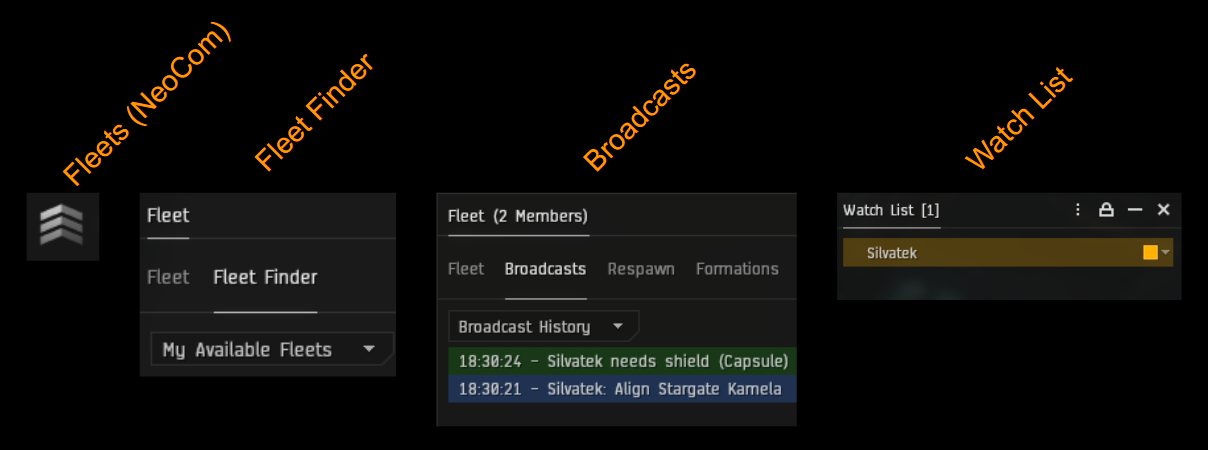
The Fleet Finder, part of the Fleet Window, is used for finding fleets that you can join. It is also possible to drop links to fleets into chat windows. To open the fleet window, use the Fleet icon in the Social Neocom folder.
FLEET COMPOSITION TAB
The default tab in the Fleet Window after you join a fleet. It shows all the fleet members, as well as the wings and squads that they can be part of. This is where you can move yourself to the correct squad if "free move" is on. Once you are in the correct squad it is best to switch to the broadcasts tab.
BROADCASTS TAB
The Broadcasts tab in the fleet window shows broadcasts from the FC and other fleet members. This should be visible whenever you are moving or fighting with the fleet. You can generally interact directly with items from the broadcast window: you can right click on things to warp or align to them, control-click on them to target them, etc.
WATCHLIST WINDOW
The Watchlist window is a separate window, not part of the Fleet Window, though it is only used when in a fleet. It is empty by default, but you can drag fleet members into it, and drag them up or down the list. There is a limit to how many pilots you can have in the watchlist, but FL33T rarely has fleets large enough for this to matter. As with the broadcasts tab, you can interact directly with items in the watch list. Always have your FC at the top of your watch list; you can use this to anchor on them easily.
OVERVIEW WINDOWS AND TABS
While the Overview itself is not only for fleet operations, you will probably have specific overview windows, tabs and settings for fleets. You should have an overview tab that only shows hostile ships, and another that only shows fleet members and/or friendly ships. It is best to set your overview to move broadcast targets to the top of the overview.
It is very important to make sure that your overview is set up correctly so that you can see the targets you need to shoot, and (just as importantly) see who you should not be shooting.
UNDOCKING CHECKLIST
Before you undock your ship, check that you are ready for combat.
- Do you have the skills to operate your chosen ship and its fittings? The easiest way to check is to simulate the fit and check for any yellow skill book warnings.
- Do you have suitable ammo for your guns, including different types if appropriate (short range, long range, T2, faction etc.)?
- Is your drone bay full? (If you have one)
- Do you have charges required for modules that need them (scripts, cap boosters, nanite repair paste)?
- Do you have some nanite repair paste for repairing modules (if trained into Thermodynamics)?
- Do you have default Orbit and/or Keep at Range distances set? (These should keep opponents within range of your weapons and tackle module(s), plus ~2km for comfort)
- Are you in the correct fleet and comms channel?
- Are you in the correct pod with the correct implants?
- If flying a capital ship or black ops, do you have enough jump fuel?
FAQ
Is there a fleet active?
Check the in-game fleet finder first, then ask in alliance chat. Also check fleet schedule in Discord.
I've joined a fleet, what ship should I be flying?
First, check the MOTD to see if it specifies a doctrine. If it doesn't, ask in fleet chat. If that doesn't work, and there isn't an active FC giving orders that everyone needs to hear, ask in voice. Note that some doctrine ships have multiple variants, such as the Cyclone Fleet Issue having 50MN MWD or 100MN AB variants.
Where do I need to be?
First, check the MOTD. Listen on comms for a bit to find out if the fleet is fighting or actively moving. You can also find the fleet by opening the in-game map, clicking the "Color by" icon at the top left, and selecting My fleet members in the Personal section. If still unsure, ask in fleet chat: someone should be able to tell you where the fleet is at the moment, and where it is heading.
The fighting has started, who should I shoot?
Make sure you have your fleet window showing, with the broadcast tab active. Your FC (or a designated target caller) will broadcast targets to shoot. The primary target will also be called out in voice comms. Shooting anyone other than the primary results in split damage, which is bad.
I'm being shot by the enemy fleet, what should I do?
Broadcast for repairs (shield or armor as appropriate) if in a doctrine ship; you should do this as soon as large numbers of enemies yellow-box you, as by the time those boxes turn red it might be too late to save you. Overheat your hardeners if you have any, and see if there is something you can align to (if not already aligned). Warp out if your logi ships aren't holding you and you aren't tackled. If you aren't in a doctrine ship then try to warp away; if you can't warp out, prepare yourself for a heroic death.
What is the logi channel, and should I be in it?
The logi channel is an in-game chat channel used for coordinating the activities of pilots flying logistics ships. If you aren't flying logistics (or you don't know what this means) then you shouldn't be in the logi channel and will cause problems if you are.
GLOSSARY
- 10MN / 50MN / 100MN Refers to the type of prop mod fitted to a cruiser or battlecruiser. "10MN" means a standard afterburner, "50MN" means a MicroWarpDrive and "100MN" means a battleship-sized (oversized) afterburner. Battlecruisers can often be fit with either 50MN MWD or 100MN AB.
- Align Move at maximum speed towards something so that you enter warp instantly if you warp to it. If all the ships in a fleet are aligned when the FC fleet-warps then all the ships will move through warp at the same speed and the fleet will all arrive together. If you aren't aligned when the fleet warps, you may become a "straggler".
- Anchor Keeping your ship close to the FC, generally by using the "keep at range 1000m" option on their ship, so that you fly where they fly.
- Boosh Using a Command Destroyer's Micro Jump Field to move a group of ships 100km away from where they were. Can be used on friendly ships for mobility, or enemy ships to reposition them to their disadvantage.
- Caps Capital ships (Dreadnoughts or Force Auxiliaries, generally).
- FC Fleet Commander, in overall command of the fleet - do what these people tell you.
- Feed "Feeding" ships to the enemy just means getting killed. Many alliances disapprove of feeding, but in FL33T we know that it is just part of the game we love.
- Free Move A fleet setting the FC can enable to allow fleet members to move themselves to the most appropriate wing/squad. If free move is on you should find yourself in the fleet window and "drag" yourself into the appropriate place.
- GFs "Good Fights" - honoring your opponent by typing "gf" in local chat after a battle.
- Grid A region of space in which ships can interact with each other, generally a few thousand km across. Your overview will show (if not filtered) all uncloaked ships on the same grid as you.
- Heat Turn on overheating for a module on your ship to increase its effectiveness. The FC may call for you to "heat guns" in which case you overheat them for a short period to apply increased damage. Overheating for too long may damage modules and make them inoperable.
- Kitchen Sink A "kitchen sink" fleet is one in which the FC allows each pilot to bring whatever ship they prefer (or have to hand).
- Lock up Apply a target lock to a ship, but don't shoot weapons at it.
- Logi Logistics ships that repair (give "reps" to) the shields or armor of other ships.
- MOTD "Message Of The Day", text at the top of the fleet chat window, which should tell you what doctrine is being used, which comms to use, and where the fleet is forming.
- Plex Short for "faction warfare complex", not to be confused with "PLEX" (Pilot's License Extension, an in-game currency).
- Primary An enemy ship that all primary fleet members should be shooting; should have been broadcast (see Broadcast tab in the fleet window) and called out by the FC.
- Props Propulsion modules: Afterburner ("AB") or MicroWarpDrive ("MWD"). Your FC will tell you whether you should have this active ("props on") or inactive ("props off"). If you are props off when you should be on then you will get separated from the rest of the fleet and die; if you are props on when you should be off then you will take more damage, use more capacitor, or be less agile than you should be, and you will die.
- Secondary An enemy ship that you should be ready to shoot ("lock up") as soon as the primary is dead. Don't shoot the secondary though; shoot the primary until it dies.
- Straggler A ship that is not keeping up with the rest of the fleet when moving. Stragglers are vulnerable to being caught and killed by enemies, even if those enemies are outmatched by the main fleet.
- Tackle Applying a warp scrambler ("scram") or warp disruptor ("point") to an enemy ship to prevent them warping away. "Tackle" can also refer to a ship that has the primary purpose of applying tackle to enemy ships.
- Toast Short for "entosis link"; worthy of an article all of its own.
- Watchlist A window that you can add fleet members to so that you can see their status at a glance. Adding your FC to the watchlist, and moving them to the top, means that you can always find them instantly. The watchlist is also critical for logi pilots to know who to focus their repairs on.
Anchor on HoneyBuns, props on, primary is MeanKid, secondary is SmellyFoot. Logi, lock up HoneyBuns. Can someone tackle that Widow? If you've just joined, see MOTD for doctrine, fleet is in Kourmonen.
FURTHER READING
- Eve University guide to fleet ops